Building Production-Ready Coding Agents with GPT-5.1: Beyond the Basics
From prototype to production: Adding the pipelines, security, and monitoring that OpenAI's cookbook doesn't cover


Introduction
OpenAI’s GPT-5.1 has revolutionized how we build coding agents. The model’s exceptional coding abilities, combined with the Responses API’s tools like shell, apply_patch, and web_search make it possible to create agents that don’t just generate code—they actively work with codebases, run commands, apply edits, and evolve projects end-to-end.
But moving from a proof-of-concept to a production-ready coding agent requires more than just powerful AI. You need robust pipeline management, comprehensive security measures, and real-time monitoring. This guide extends OpenAI’s coding agent cookbook with enterprise-grade practices.
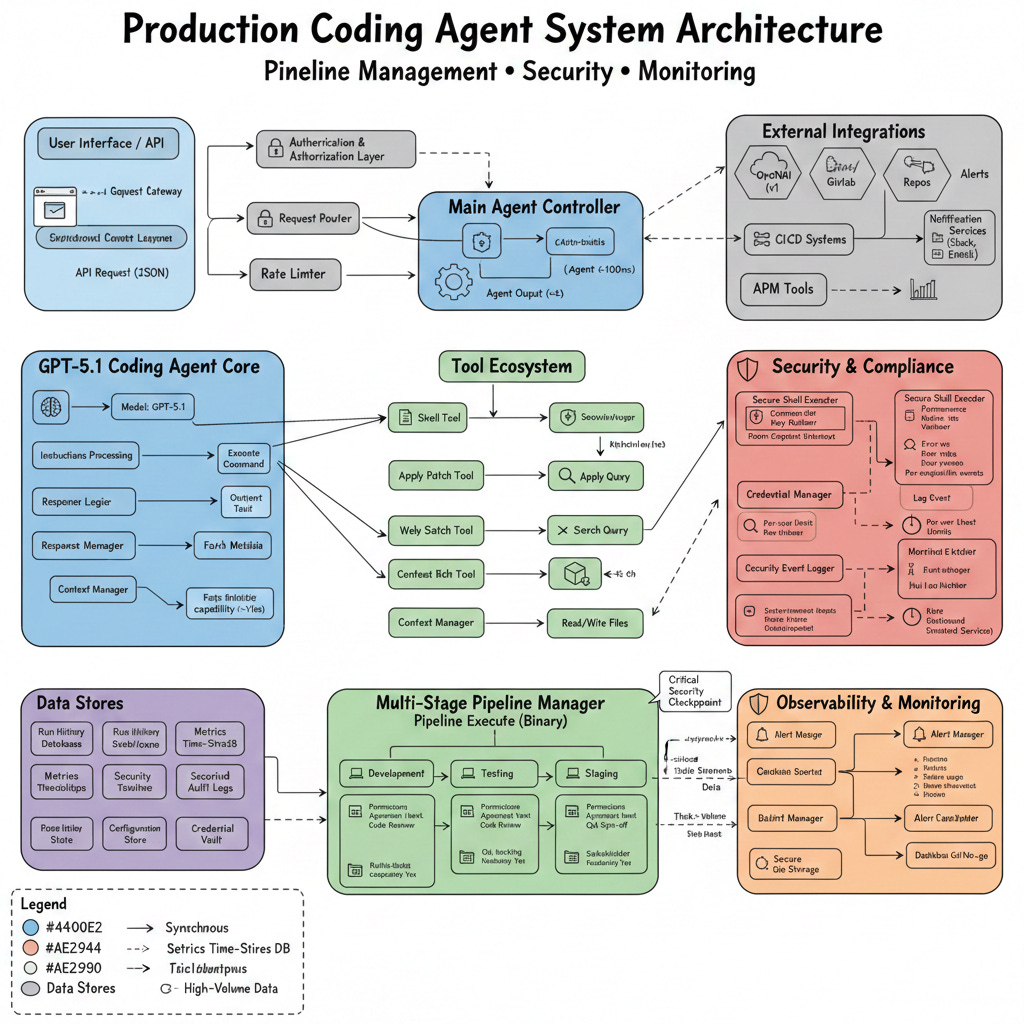
Part 1: Foundation - Understanding the Base Agent
The Core Architecture
The basic coding agent from OpenAI’s cookbook uses four essential tools:
shell: Execute commands for scaffolding, installing dependencies, and running builds
apply_patch: Make surgical edits to files using unified diffs
web_search: Look up current documentation and best practices
Context7 MCP: Access up-to-date API documentation
Here’s the foundational setup:
python
from agents import Agent, Runner, ShellTool, WebSearchTool, ApplyPatchTool

INSTRUCTIONS = “”“
You are a coding agent that helps scaffold and iterate on projects.

When building:
- Use web_search to find the right commands for the tech stack
- Use shell to create files and install dependencies
- Never edit code via shell commands
- Always read files with `cat` before using apply_patch
- Generate unified diffs relative to EXACTLY the file content
- Use apply_patch only once per edit attempt

When the user refers to external APIs, use Context7 to fetch current docs.
“”“

coding_agent = Agent(
    name=”Coding Agent”,
    model=”gpt-5.1”,
    instructions=INSTRUCTIONS,
    tools=[
        WebSearchTool(),
        ShellTool(),
        ApplyPatchTool(),
        Context7Tool()
    ]
)
Part 2: Pipeline Management for Coding Agents
Why Pipelines Matter
In production environments, coding agents need to work within structured workflows: development → testing → staging → production. Let’s build a pipeline management system.
Pipeline Architecture
python
from enum import Enum
from dataclasses import dataclass
from typing import List, Optional, Callable
import asyncio
from datetime import datetime

class PipelineStage(Enum):
    DEVELOPMENT = “development”
    TESTING = “testing”
    STAGING = “staging”
    PRODUCTION = “production”

class PipelineStatus(Enum):
    PENDING = “pending”
    RUNNING = “running”
    SUCCESS = “success”
    FAILED = “failed”
    BLOCKED = “blocked”

@dataclass
class PipelineConfig:
    “”“Configuration for a coding agent pipeline”“”
    name: str
    stages: List[PipelineStage]
    approval_required: List[PipelineStage]  # Stages requiring human approval
    rollback_enabled: bool = True
    max_retries: int = 3
    timeout_minutes: int = 30

@dataclass
class PipelineRun:
    “”“Represents a single pipeline execution”“”
    run_id: str
    config: PipelineConfig
    current_stage: PipelineStage
    status: PipelineStatus
    started_at: datetime
    completed_at: Optional[datetime] = None
    error_message: Optional[str] = None
    artifacts: dict = None
Pipeline Manager Implementation
python
class CodingAgentPipeline:
    “”“Manages multi-stage pipelines for coding agents”“”

    def __init__(self, agent: Agent, config: PipelineConfig):
        self.agent = agent
        self.config = config
        self.current_run: Optional[PipelineRun] = None
        self.history: List[PipelineRun] = []

    async def execute_stage(
        self,
        stage: PipelineStage,
        prompt: str,
        context: dict = None
    ) -> dict:
        “”“Execute a single pipeline stage”“”

        stage_prompt = self._build_stage_prompt(stage, prompt, context)

        try:
            # Execute agent with stage-specific configuration
            result = await self.agent.run(
                stage_prompt,
                max_turns=self.config.max_retries,
                timeout=self.config.timeout_minutes * 60
            )

            return {
                “status”: “success”,
                “output”: result,
                “timestamp”: datetime.now().isoformat()
            }

        except Exception as e:
            return {
                “status”: “failed”,
                “error”: str(e),
                “timestamp”: datetime.now().isoformat()
            }

    def _build_stage_prompt(
        self,
        stage: PipelineStage,
        prompt: str,
        context: dict = None
    ) -> str:
        “”“Build stage-specific prompt with safety constraints”“”

        stage_constraints = {
            PipelineStage.DEVELOPMENT: “”“
                You have full access to create and modify files.
                Feel free to experiment and iterate rapidly.
            “”“,
            PipelineStage.TESTING: “”“
                TESTING STAGE - You can only:
                - Run tests using shell commands
                - Read files to understand test results
                - Suggest fixes (but NOT apply them)
                Do NOT modify any source code.
            “”“,
            PipelineStage.STAGING: “”“
                STAGING STAGE - Limited write access:
                - You can update configuration files
                - You can apply hotfixes to non-critical files
                - For source code changes, request approval
            “”“,
            PipelineStage.PRODUCTION: “”“
                PRODUCTION STAGE - READ ONLY:
                - You can only read files and check status
                - All changes require explicit approval
                - Document any issues you find
            “”“
        }

        return f”“”
{stage_constraints[stage]}

Context from previous stages:
{context or ‘None’}

User request:
{prompt}
“”“

    async def run_pipeline(self, initial_prompt: str) -> PipelineRun:
        “”“Execute complete pipeline with all stages”“”

        run_id = f”run_{datetime.now().strftime(’%Y%m%d_%H%M%S’)}”
        self.current_run = PipelineRun(
            run_id=run_id,
            config=self.config,
            current_stage=self.config.stages[0],
            status=PipelineStatus.RUNNING,
            started_at=datetime.now(),
            artifacts={}
        )

        context = {}

        for stage in self.config.stages:
            self.current_run.current_stage = stage

            # Check if approval required
            if stage in self.config.approval_required:
                approval = await self._request_approval(stage, context)
                if not approval:
                    self.current_run.status = PipelineStatus.BLOCKED
                    self.current_run.error_message = f”Approval denied at {stage.value}”
                    break

            # Execute stage
            result = await self.execute_stage(stage, initial_prompt, context)

            # Store artifacts
            self.current_run.artifacts[stage.value] = result

            if result[”status”] == “failed”:
                self.current_run.status = PipelineStatus.FAILED
                self.current_run.error_message = result[”error”]

                # Attempt rollback if enabled
                if self.config.rollback_enabled:
                    await self._rollback(stage)
                break

            # Update context for next stage
            context[stage.value] = result[”output”]

        else:
            # Pipeline completed successfully
            self.current_run.status = PipelineStatus.SUCCESS

        self.current_run.completed_at = datetime.now()
        self.history.append(self.current_run)

        return self.current_run

    async def _request_approval(
        self,
        stage: PipelineStage,
        context: dict
    ) -> bool:
        “”“Request human approval for stage execution”“”
        print(f”\n{’=’*60}”)
        print(f”APPROVAL REQUIRED: {stage.value}”)
        print(f”{’=’*60}”)
        print(f”Context: {context}”)
        print(”\nProceed with this stage? [y/N]: “, end=”“)

        # In production, this would integrate with your approval system
        # For now, we’ll use input
        response = input().strip().lower()
        return response == ‘y’

    async def _rollback(self, failed_stage: PipelineStage):
        “”“Rollback changes from failed stage”“”
        print(f”Rolling back changes from {failed_stage.value}...”)
        # Implementation depends on your version control system
        # Could use git, backup files, or database transactions
Using the Pipeline
python
# Configure a pipeline
pipeline_config = PipelineConfig(
    name=”Web App Deployment”,
    stages=[
        PipelineStage.DEVELOPMENT,
        PipelineStage.TESTING,
        PipelineStage.STAGING,
        PipelineStage.PRODUCTION
    ],
    approval_required=[
        PipelineStage.STAGING,
        PipelineStage.PRODUCTION
    ],
    rollback_enabled=True,
    max_retries=3,
    timeout_minutes=30
)

# Create pipeline with your agent
pipeline = CodingAgentPipeline(coding_agent, pipeline_config)

# Run it
run = await pipeline.run_pipeline(
    “Create a dashboard with user authentication and data visualization”
)

print(f”Pipeline {run.run_id}: {run.status.value}”)
Part 3: Security Hardening
Core Security Principles
Coding agents can execute arbitrary code, making security paramount. Let’s implement defense-in-depth.
1. Command Sandboxing
python
import subprocess
import shlex
from typing import List, Set

class SecureShellExecutor:
    “”“Sandboxed shell execution with security constraints”“”

    ALLOWED_COMMANDS = {
        # File operations
        ‘cat’, ‘ls’, ‘mkdir’, ‘touch’, ‘rm’, ‘cp’, ‘mv’,
        # Package managers (with restrictions)
        ‘npm’, ‘pip’, ‘yarn’, ‘poetry’,
        # Build tools
        ‘make’, ‘cmake’, ‘cargo’, ‘go’,
        # Version control
        ‘git’,
        # Testing
        ‘pytest’, ‘jest’, ‘mocha’,
    }

    FORBIDDEN_PATTERNS = [
        ‘sudo’,
        ‘chmod +x’,
        ‘eval’,
        ‘curl | bash’,
        ‘wget | sh’,
        ‘& &’,  # Background execution
        ‘>’,    # Redirection (can be used for data exfiltration)
        ‘2>&1’, # Error redirection
        ‘${’,   # Variable expansion
    ]

    def __init__(self, workspace_dir: str, allowed_paths: List[str]):
        self.workspace_dir = workspace_dir
        self.allowed_paths = set(allowed_paths)
        self.command_log = []

    def validate_command(self, command: str) -> tuple[bool, str]:
        “”“Validate command against security policies”“”

        # Check for forbidden patterns
        for pattern in self.FORBIDDEN_PATTERNS:
            if pattern in command:
                return False, f”Forbidden pattern detected: {pattern}”

        # Parse command
        try:
            parts = shlex.split(command)
        except ValueError as e:
            return False, f”Invalid command syntax: {e}”

        if not parts:
            return False, “Empty command”

        # Check if base command is allowed
        base_command = parts[0]
        if base_command not in self.ALLOWED_COMMANDS:
            return False, f”Command not in allowlist: {base_command}”

        # Validate file paths
        for part in parts[1:]:
            if part.startswith(’/’) or ‘..’ in part:
                # Absolute paths or directory traversal
                if not any(part.startswith(allowed) for allowed in self.allowed_paths):
                    return False, f”Path not in allowed directories: {part}”

        return True, “OK”

    async def execute(
        self,
        command: str,
        timeout: int = 30,
        require_approval: bool = False
    ) -> dict:
        “”“Execute command with security checks”“”

        # Validate
        is_valid, message = self.validate_command(command)
        if not is_valid:
            return {
                “success”: False,
                “error”: f”Security violation: {message}”,
                “output”: “”,
                “command”: command
            }

        # Request approval if needed
        if require_approval:
            print(f”\nCommand requires approval: {command}”)
            print(”Execute? [y/N]: “, end=”“)
            if input().strip().lower() != ‘y’:
                return {
                    “success”: False,
                    “error”: “User denied approval”,
                    “output”: “”,
                    “command”: command
                }

        # Log command
        self.command_log.append({
            “command”: command,
            “timestamp”: datetime.now().isoformat()
        })

        # Execute in sandbox
        try:
            result = subprocess.run(
                shlex.split(command),
                cwd=self.workspace_dir,
                capture_output=True,
                text=True,
                timeout=timeout,
                # Security: limit resource usage
                env={
                    ‘PATH’: ‘/usr/local/bin:/usr/bin:/bin’,
                    ‘HOME’: self.workspace_dir,
                    ‘TMPDIR’: f”{self.workspace_dir}/tmp”
                }
            )

            return {
                “success”: result.returncode == 0,
                “output”: result.stdout,
                “error”: result.stderr,
                “return_code”: result.returncode,
                “command”: command
            }

        except subprocess.TimeoutExpired:
            return {
                “success”: False,
                “error”: f”Command timed out after {timeout}s”,
                “output”: “”,
                “command”: command
            }
        except Exception as e:
            return {
                “success”: False,
                “error”: str(e),
                “output”: “”,
                “command”: command
            }
2. API Key Management
python
import os
from cryptography.fernet import Fernet
from typing import Optional

class SecureCredentialManager:
    “”“Secure storage and access for API keys and credentials”“”

    def __init__(self, encryption_key: Optional[bytes] = None):
        if encryption_key is None:
            encryption_key = Fernet.generate_key()
        self.cipher = Fernet(encryption_key)
        self.credentials = {}

    def store_credential(self, name: str, value: str):
        “”“Store encrypted credential”“”
        encrypted = self.cipher.encrypt(value.encode())
        self.credentials[name] = encrypted

    def get_credential(self, name: str) -> Optional[str]:
        “”“Retrieve and decrypt credential”“”
        if name not in self.credentials:
            return None
        encrypted = self.credentials[name]
        decrypted = self.cipher.decrypt(encrypted)
        return decrypted.decode()

    def get_safe_agent_credentials(self) -> dict:
        “”“Get credentials formatted for agent use”“”
        return {
            ‘OPENAI_API_KEY’: self.get_credential(’openai_api_key’),
            # Never expose the full key to logs
            ‘OPENAI_KEY_PREFIX’: self.get_credential(’openai_api_key’)[:10] + ‘...’
        }

# Usage
cred_manager = SecureCredentialManager()
cred_manager.store_credential(’openai_api_key’, os.getenv(’OPENAI_API_KEY’))

# Agent gets credentials securely
agent_creds = cred_manager.get_safe_agent_credentials()
3. Rate Limiting and Abuse Prevention
python
from collections import defaultdict
from datetime import datetime, timedelta
import asyncio

class RateLimiter:
    “”“Prevent abuse through rate limiting”“”

    def __init__(self):
        self.requests = defaultdict(list)
        self.limits = {
            ‘agent_runs’: (10, 3600),      # 10 runs per hour
            ‘shell_commands’: (100, 3600),  # 100 commands per hour
            ‘api_calls’: (1000, 3600),      # 1000 API calls per hour
        }

    def check_limit(self, key: str, identifier: str) -> tuple[bool, str]:
        “”“Check if request is within rate limits”“”

        if key not in self.limits:
            return True, “OK”

        max_requests, window_seconds = self.limits[key]
        now = datetime.now()
        window_start = now - timedelta(seconds=window_seconds)

        # Clean old requests
        self.requests[f”{key}:{identifier}”] = [
            req_time for req_time in self.requests[f”{key}:{identifier}”]
            if req_time > window_start
        ]

        current_count = len(self.requests[f”{key}:{identifier}”])

        if current_count >= max_requests:
            return False, f”Rate limit exceeded: {current_count}/{max_requests} in {window_seconds}s”

        # Record this request
        self.requests[f”{key}:{identifier}”].append(now)
        return True, “OK”

# Usage
rate_limiter = RateLimiter()

async def rate_limited_agent_run(agent, prompt, user_id):
    allowed, message = rate_limiter.check_limit(’agent_runs’, user_id)
    if not allowed:
        raise Exception(f”Rate limit exceeded: {message}”)

    return await agent.run(prompt)
Part 4: Comprehensive Monitoring
Monitoring Architecture
python
from dataclasses import dataclass, field
from typing import Dict, List
import json
import asyncio
from datetime import datetime

@dataclass
class AgentMetrics:
    “”“Comprehensive agent performance metrics”“”
    agent_id: str
    timestamp: datetime = field(default_factory=datetime.now)

    # Performance metrics
    total_runs: int = 0
    successful_runs: int = 0
    failed_runs: int = 0
    avg_duration_seconds: float = 0.0

    # Resource metrics
    total_tokens_used: int = 0
    total_api_calls: int = 0
    total_shell_commands: int = 0

    # Error tracking
    error_types: Dict[str, int] = field(default_factory=dict)
    recent_errors: List[str] = field(default_factory=list)

    # Security metrics
    blocked_commands: int = 0
    security_violations: int = 0

class AgentMonitor:
    “”“Real-time monitoring for coding agents”“”

    def __init__(self, agent_id: str):
        self.agent_id = agent_id
        self.metrics = AgentMetrics(agent_id=agent_id)
        self.run_history = []
        self.alerts = []

    def record_run_start(self, run_id: str, prompt: str):
        “”“Record start of agent run”“”
        self.metrics.total_runs += 1
        self.run_history.append({
            ‘run_id’: run_id,
            ‘status’: ‘started’,
            ‘prompt’: prompt[:100],  # Truncate for storage
            ‘started_at’: datetime.now().isoformat()
        })

    def record_run_complete(
        self,
        run_id: str,
        success: bool,
        duration: float,
        tokens_used: int,
        error: Optional[str] = None
    ):
        “”“Record completion of agent run”“”

        if success:
            self.metrics.successful_runs += 1
        else:
            self.metrics.failed_runs += 1
            if error:
                error_type = type(error).__name__
                self.metrics.error_types[error_type] = \
                    self.metrics.error_types.get(error_type, 0) + 1
                self.metrics.recent_errors.append(str(error)[:200])
                if len(self.metrics.recent_errors) > 10:
                    self.metrics.recent_errors.pop(0)

        # Update average duration
        total_duration = self.metrics.avg_duration_seconds * (self.metrics.total_runs - 1)
        self.metrics.avg_duration_seconds = (total_duration + duration) / self.metrics.total_runs

        self.metrics.total_tokens_used += tokens_used

        # Update run history
        for run in self.run_history:
            if run[’run_id’] == run_id:
                run[’status’] = ‘success’ if success else ‘failed’
                run[’completed_at’] = datetime.now().isoformat()
                run[’duration’] = duration
                run[’error’] = error
                break

        # Check for alerts
        self._check_alerts()

    def record_security_event(self, event_type: str, details: str):
        “”“Record security-related event”“”
        self.metrics.security_violations += 1
        self.alerts.append({
            ‘type’: ‘security’,
            ‘event_type’: event_type,
            ‘details’: details,
            ‘timestamp’: datetime.now().isoformat()
        })

    def _check_alerts(self):
        “”“Check if any alert conditions are met”“”

        # Alert if error rate is high
        if self.metrics.total_runs >= 10:
            error_rate = self.metrics.failed_runs / self.metrics.total_runs
            if error_rate > 0.3:  # 30% error rate
                self.alerts.append({
                    ‘type’: ‘error_rate’,
                    ‘message’: f’High error rate: {error_rate:.1%}’,
                    ‘timestamp’: datetime.now().isoformat()
                })

        # Alert if token usage is excessive
        avg_tokens = self.metrics.total_tokens_used / max(self.metrics.total_runs, 1)
        if avg_tokens > 50000:
            self.alerts.append({
                ‘type’: ‘token_usage’,
                ‘message’: f’High average token usage: {avg_tokens:.0f}’,
                ‘timestamp’: datetime.now().isoformat()
            })

    def get_dashboard_data(self) -> dict:
        “”“Get data formatted for monitoring dashboard”“”
        return {
            ‘agent_id’: self.agent_id,
            ‘timestamp’: datetime.now().isoformat(),
            ‘metrics’: {
                ‘total_runs’: self.metrics.total_runs,
                ‘success_rate’: self.metrics.successful_runs / max(self.metrics.total_runs, 1),
                ‘avg_duration’: self.metrics.avg_duration_seconds,
                ‘total_tokens’: self.metrics.total_tokens_used,
                ‘security_violations’: self.metrics.security_violations
            },
            ‘recent_runs’: self.run_history[-10:],
            ‘alerts’: self.alerts[-5:],
            ‘error_distribution’: self.metrics.error_types
        }

    def export_metrics(self, filepath: str):
        “”“Export metrics to JSON file”“”
        with open(filepath, ‘w’) as f:
            json.dump(self.get_dashboard_data(), f, indent=2)
Integration Example
python
class MonitoredCodingAgent:
    “”“Coding agent with integrated monitoring”“”

    def __init__(
        self,
        agent: Agent,
        shell_executor: SecureShellExecutor,
        monitor: AgentMonitor,
        rate_limiter: RateLimiter
    ):
        self.agent = agent
        self.shell_executor = shell_executor
        self.monitor = monitor
        self.rate_limiter = rate_limiter

    async def run(
        self,
        prompt: str,
        user_id: str,
        require_approval: bool = False
    ) -> dict:
        “”“Execute agent with full monitoring and security”“”

        run_id = f”run_{datetime.now().strftime(’%Y%m%d_%H%M%S’)}”
        start_time = datetime.now()

        # Check rate limits
        allowed, msg = self.rate_limiter.check_limit(’agent_runs’, user_id)
        if not allowed:
            self.monitor.record_security_event(’rate_limit’, msg)
            raise Exception(f”Rate limit exceeded: {msg}”)

        # Start monitoring
        self.monitor.record_run_start(run_id, prompt)

        try:
            # Run agent
            result = await self.agent.run(prompt)

            # Calculate metrics
            duration = (datetime.now() - start_time).total_seconds()
            tokens_used = result.get(’usage’, {}).get(’total_tokens’, 0)

            # Record success
            self.monitor.record_run_complete(
                run_id,
                success=True,
                duration=duration,
                tokens_used=tokens_used
            )

            return {
                ‘run_id’: run_id,
                ‘success’: True,
                ‘result’: result,
                ‘metrics’: {
                    ‘duration’: duration,
                    ‘tokens’: tokens_used
                }
            }

        except Exception as e:
            duration = (datetime.now() - start_time).total_seconds()

            # Record failure
            self.monitor.record_run_complete(
                run_id,
                success=False,
                duration=duration,
                tokens_used=0,
                error=str(e)
            )

            return {
                ‘run_id’: run_id,
                ‘success’: False,
                ‘error’: str(e),
                ‘metrics’: {
                    ‘duration’: duration
                }
            }
Part 5: Putting It All Together
Complete Production Setup
python
import os
from pathlib import Path

async def create_production_coding_agent():
    “”“Create a fully configured production coding agent”“”

    # 1. Setup workspace
    workspace_dir = Path(”./agent_workspace”)
    workspace_dir.mkdir(exist_ok=True)

    # 2. Setup security
    cred_manager = SecureCredentialManager()
    cred_manager.store_credential(
        ‘openai_api_key’,
        os.getenv(’OPENAI_API_KEY’)
    )

    shell_executor = SecureShellExecutor(
        workspace_dir=str(workspace_dir),
        allowed_paths=[str(workspace_dir)]
    )

    rate_limiter = RateLimiter()

    # 3. Create base agent
    base_agent = Agent(
        name=”Production Coding Agent”,
        model=”gpt-5.1”,
        instructions=”“”
        You are a production coding agent operating in a secure environment.

        Security rules:
        - All shell commands are validated before execution
        - You cannot access paths outside the workspace
        - Certain commands require approval
        - Your actions are logged and monitored

        Best practices:
        - Always read files before editing
        - Use apply_patch for code changes
        - Run tests after making changes
        - Document your changes clearly
        “”“,
        tools=[
            WebSearchTool(),
            shell_executor,
            ApplyPatchTool(),
            Context7Tool()
        ]
    )

    # 4. Setup monitoring
    monitor = AgentMonitor(agent_id=”prod_agent_001”)

    # 5. Create monitored agent
    monitored_agent = MonitoredCodingAgent(
        agent=base_agent,
        shell_executor=shell_executor,
        monitor=monitor,
        rate_limiter=rate_limiter
    )

    # 6. Setup pipeline
    pipeline_config = PipelineConfig(
        name=”Production Deployment Pipeline”,
        stages=[
            PipelineStage.DEVELOPMENT,
            PipelineStage.TESTING,
            PipelineStage.STAGING,
            PipelineStage.PRODUCTION
        ],
        approval_required=[
            PipelineStage.PRODUCTION
        ],
        rollback_enabled=True
    )

    pipeline = CodingAgentPipeline(monitored_agent, pipeline_config)

    return {
        ‘agent’: monitored_agent,
        ‘pipeline’: pipeline,
        ‘monitor’: monitor,
        ‘shell_executor’: shell_executor
    }

# Usage
async def main():
    # Create production agent
    system = await create_production_coding_agent()

    # Run a task through the pipeline
    result = await system[’pipeline’].run_pipeline(
        “Create a REST API with authentication using FastAPI”
    )

    # Check monitoring data
    dashboard_data = system[’monitor’].get_dashboard_data()
    print(json.dumps(dashboard_data, indent=2))

    # Export metrics
    system[’monitor’].export_metrics(’agent_metrics.json’)

# Run it
if __name__ == ‘__main__’:
    asyncio.run(main())
Best Practices Summary
Pipeline Management
Always use multi-stage pipelines for production deployments
Require approval for sensitive stages
Implement rollback mechanisms
Set appropriate timeouts and retry limits
Log all pipeline executions
Security
Sandbox all shell command execution
Maintain an allowlist of safe commands
Encrypt API keys and credentials
Implement rate limiting
Log all security events
Never trust user input without validation
Monitoring
Track performance metrics continuously
Set up alerting for anomalies
Monitor token usage and costs
Keep detailed error logs
Export metrics for analysis
Create dashboards for visibility
Conclusion
Building production-ready coding agents requires careful attention to pipeline management, security, and monitoring. By extending OpenAI’s excellent foundation with these enterprise-grade practices, you can deploy coding agents that are not just powerful but also safe, reliable, and observable.
The complete code examples in this guide provide a solid starting point. Adapt them to your specific needs, always prioritizing security and reliability over convenience.
Ready to deploy your coding agent to production? Remember: start with tight restrictions and gradually loosen them as you build confidence in your system’s behavior. Monitor everything, trust nothing by default, and always have a rollback plan.
 | A guest post by
|
Great guardrails and services to the same for the good 😊